

How to Write a Product Requirements Document (PRD)

Table of Contents
A product manager attends a sprint review and hears a common complaint from three engineers. They built a new feature, but it does not match the original request.
Nobody lied or acted carelessly: the team just stored the project rules in too many places. One detail lived in a Slack thread, another sat in a whiteboard photo, and a third one hid inside a Figma comment. Naturally, the instructions drifted apart over time.
When the developers finally shipped the code, three different people held three different ideas of the final product. None of those ideas matched.
A Product Requirements Document can solve this exact problem. This document does not create extra red tape but simply provides one central place for your team to check when memories fade or opinions clash.
What Is a PRD Document?

As for PRD meaning, it stands for Product Requirements Document. Some teams call it a product spec or a feature brief instead. It provides a clear written description of what you need to build and the reason behind it. Your entire team agrees on this plan before work starts.
This document covers three specific details:
- The problem you want to fix.
- The specific people who need the solution.
- The capabilities the final product must include.
Once your team approves the file, it becomes the reference point that design, engineering, and QA can check against. They never have to depend on human memory or notes from an old conversation ever again.
A PRD sits upstream from your other project files and only defines the ‘what’ and the ‘why’. It leaves the rest of the details to three major downstream documents:
- Technical specifications: A PRD never explains how engineers will write the code. It leaves system architecture, data models, and API rules to the tech specs.
- Marketing documents: A PRD never focuses on product placement or market launch strategies.
- Project plans: A PRD never sets daily timelines or assigns tasks to specific people.
The PRD just sets the main goal and lets those other documents handle the ‘how’ and ‘when’.
Teams often skip this document to save time and pay a massive price for it later. Quite naturally, if you discover a defect at the end of a project, you will spend far more money to fix it. Industry experts estimate that American companies waste $30 billion every year and spend it just to redo work due to unclear initial instructions.
A PRD will never eliminate every single risk. However, it gives your team a fixed target, so you can spot misaligned goals and clarify the scope of the project early. This way, you will be able to solve the problem before your developers write the code.
What Should a PRD Include?

A product requirements document does not need to be forty pages long. It just needs a clear structure.
Anyone on your team should be able to open the file and immediately understand the main problem, the target users, and the project boundaries.
In practice, a solid PRD only needs to cover four important aspects:
- The objective: What problem do you want to solve?
- The audience: Who will use this product?
- The features: What specific tools must the team deliver?
- The constraints: What hard limits must the team respect?
- Objective and Success Metrics
Start your document with the problem and your main goal. Use only one or two sentences. Then, attach a unique number to it.
For example, tell your team to reduce user drop-offs from 40 percent to 25 percent within 60 days. This gives them a clear target to plan everything.
Never use vague phrases like ‘improve the user experience’. These words lack measurable data, so everyone on your team will interpret that phrase differently.
Remember, if a PRD lacks a success metric, it just becomes a wish list. You must know exactly how to measure your final results. If you cannot define that metric, pause and rethink your main objective before writing the rest of the document.
Data shows that 71% of projects fail due to poor requirements management. When teams define clear requirements before work begins, their projects are more likely to succeed. It implies that the goals and metrics in the first section of your PRD literally determine if your entire project will survive or fail.
1. User Personas and Use Cases
Always describe the people who will use your new feature. This section turns the PRD’s user focus into a practical tool.
Explain their roles, main goals, and current daily problems. You only need two or three user profiles. If you add more, your document tries to please everyone. A product built for everyone usually serves no one well at all.
Next, match each profile with a concrete use case. Show how this person will interact with the feature.
Here is a quick example:
- Bad: Sales managers need better reports.
- Good: As a sales manager, I need a region filter on the pipeline report so I can prepare a quarterly review.
That second sentence gives your engineers a perfect blueprint. It carries much more weight because it places the new feature inside a clear, everyday scenario.
2. Feature Requirements and Prioritization
You need to list every single feature for your new release. For each item, provide a short description and identify what user problem it solves.
You also need clear acceptance criteria. Make this metric unique so anyone can verify if the team actually finished the work.
Next, prioritize these features. It means you should sort your ideas into four clear buckets:
- Must-have
- Should-have
- Could-have
- Won’t-have
The last category matters just as much as your feature list. A good PRD states what falls out of scope.
If you only show the required features, your team will constantly ask about extra ideas. A documented ‘won’t-have’ list answers those questions immediately. This simple trick stops scope creep before it ever starts.
3. Design Notes and Technical Constraints
Include wireframes, flow diagrams, or basic mockups if you have them. These visuals do not need perfect polish. A rough sketch works perfectly, so long as it gives your engineers and designers a clear starting point.
Next, you should list your technical limits. Tell the team which web browsers they must support. Also, outline your performance goals, security rules, and strict regulatory laws.
Early drafts often mix up three concepts. You should separate them clearly:
- Assumptions: These are conditions you expect to remain true, but you cannot confirm them yet.
- Constraints: These are hard technical limits on the actual project.
- Dependencies: These are outside teams or existing systems that your new feature relies on.
When you define these three items clearly, you will be able to prevent hours of useless debate. The end result? Your engineers can scope the project immediately without constant questions.
How to Write and Share a PRD
1. Draft, Review, and Iterate
It is important to write your first draft of the product requirements document using user research, stakeholder chats, and personal notes. Once you finish the file, share it with your product team first. After they approve it, send the document to your engineers, designers, and QA testers.
You want these teams to ask hard questions and push back. This review phase exposes hidden gaps in your plan. For example:
- An engineer may spot a rare edge case.
- A designer may notice two rules that conflict with each other.
- Use this feedback to revise your work before you finalize the document.
Never hand off a first draft without a strict review. If you skip this step, your team will interrupt you with endless questions once they write the code. Therefore, you should try hard to solve those problems up front.
2. Format and Distribute the Final Document
Most teams write their PRDs in Confluence, Notion, or Google Docs. These apps allow team members to collaborate and leave comments easily.
Once you finish the draft, you need a strict system to manage the final file. For instance:
- Lock the format: Save the final version as a PDF before you share it outside your workspace. This step ensures everyone sees the same layout.
- Fix errors directly: If you spot a typo in the exported file, use a tool like PDFAid PDF editor to adjust the text. You do not have to open the original source document again just to make simple changes.
- Create a central hub: Store the file in a shared folder. Always label the most current version clearly.
Always remember that if three different people hold three slightly different copies in their private inboxes, this will ruin the entire system and completely defeat the main purpose of the document.
Mistakes That Make a PRD Useless
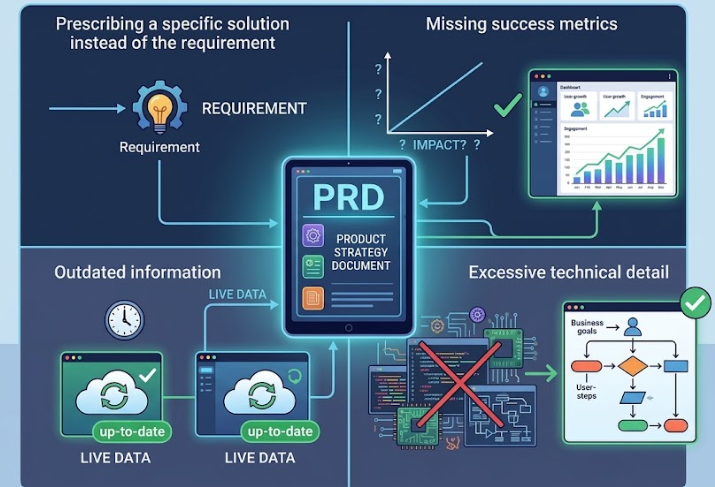
A product requirements document usually fails for a few predictable reasons. You can spot these mistakes easily once you know what to look for.
- You ask for a particular solution: ‘Add a dropdown menu’ represents a design choice. ‘Users must filter results by category’ represents a true requirement. The first phrase boxes your designers into a corner. The second phrase gives them room to do their job.
- You leave out success metrics: If you lack a measurable outcome like OKRs, you can never evaluate if the feature truly worked. Your team learns absolutely nothing from the release, except whether it shipped on time.
- You never update the file: If you write the document once and never touch it again, it just becomes an old historical record. It loses all value for the active project. Keep a simple change log and update the file as requirements shift. However, you should also know when to freeze the file. Once your team ships the feature and hits the success metrics, lock the document.
- You add too many technical details: A PRD only covers the ‘what’ and the ‘why’. You should leave the ‘how’ for the technical documents. If your PRD shares strict rules, it fails as a shared reference. It just creates constant friction with the people who build the product.
A Document Worth Writing
A product requirements document earns its place when it answers three questions clearly: what problem are we solving, what does the solution look like from the user’s side, and how will we know it worked. Teams that take the time to answer those questions before writing code tend to spend less time re-explaining themselves in sprint reviews later.
Key Takeaways
- Define the goal: Only explain what to build and why you need it.
- Set clear targets: Start the document with a specific objective and a measurable success metric.
- Know your audience: Add user personas and proper use cases, along with your prioritized features and strict project boundaries.
- Review the draft: Share the document with your entire team before you hand it off to catch hidden gaps early.
- Update the file: Treat the PRD as a living document and update it whenever your project requirements change.
FAQs
What is a PRD in product management?
The product requirements document defines the features your next product release must include. It builds a bridge between your big business goals and the development work. PRD takes your strategic objectives and turns them into specific, actionable requirements.
A PRD explains:
- The problem you want to solve.
- The specific users who face this problem.
- The required capabilities of the final release.
This gives your product, design, and tech teams a shared reference guide. They can check this exact document whenever questions pop up in the middle of a sprint.
How long should a product requirements document be?
The length of your product requirements document depends entirely on the size of your project. You should always prioritize clear communication over total word count.
Here is a basic guide:
- Small feature updates: You only need one or two pages. Just explain the main objective, a few use cases, and a short list of rules.
- Major product launches: A huge release requires a larger file. You might have to write five to ten pages so you can include multiple user profiles, strict acceptance criteria, and hard technical limits.
What is the difference between a PRD and a BRD?
People often confuse a PRD with a BRD. You need to know the PRD meaning to clearly distinguish between them.
- The BRD: This document handles the business case. It outlines market opportunities, revenue goals, and your competitive strategy. It answers one simple question. Why should we create this product?
- The PRD: This document focuses on the actual user. It lists the features, target personas, and strict acceptance criteria. It answers a completely different question. What exactly must we construct?
In the real world, your team usually approves the BRD first. The conclusions from that initial business file flow directly into your new PRD.
Should a PRD include wireframes?
Anyone learning how to write a PRD often underestimates the importance of using visuals. In reality, wireframes and flow diagrams clarify the user experience. Without them, your designers and engineers will read the same text but picture completely different products. In most cases, a few basic items work perfectly:
- Rough pencil sketches
- Basic screen mockups
- Simple flow charts
If you leave out these visuals, you take a massive risk. Your team might build a product that technically follows all your written rules. However, that final version will completely miss the user experience you wanted to create.
Author Profile

- Passionate content creator, contributor, freelance writer and content marketing allrounder.
Latest entries
 Business TipsSeptember 23, 2026How to Write a Product Requirements Document (PRD)
 Business TipsJune 25, 2026Protect Your Business: 5 Steps to Keep Your Sensitive Data Safe in 2026
 Business NewsFebruary 4, 20266 Ways UK Businesses Can Cut Logistics Costs Without Compromising Delivery Speed
 Business NewsNovember 14, 2025How Emerging Markets Shape the Next Wave of Online Gaming Growth