
How to Install an International eSIM on iOS and Android

Table of Contents
Reliable mobile data access supports navigation, reservations, and essential online services during travel. And if you’re a digital nomad like many ClickDoers, you’ll need constant web access to work from wherever you are.
Digital SIM technology allows activation without handling a physical card, which simplifies preparation.
Many modern smartphones include this feature within their network settings. A clear setup process ensures consistent connectivity from the moment service begins.
An international eSIM allows travelers to activate a mobile data plan digitally before departure. The process involves scanning a QR code or entering activation details through device settings. Clear instructions reduce setup errors and help complete activation without delays.
A structured approach ensures the device connects properly to available networks.
Device Compatibility Check
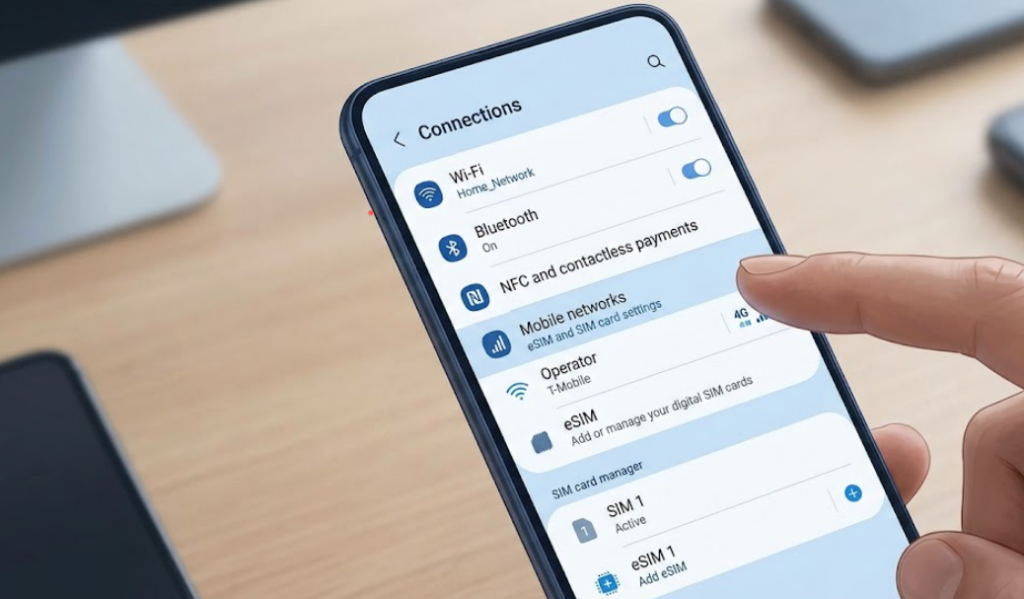
Device compatibility determines whether installation will proceed without technical issues. Most recent smartphones include international eSIM support, though availability depends on model specifications. Users can verify this feature within network or cellular settings before purchase. Confirming compatibility prevents failed activation attempts later.
Unlocked status also plays a critical role in successful installation. Carrier restrictions may block external profiles from being added to the device. Users should confirm that their phone is not limited to a single network. A compatible and unlocked device supports smooth installation and reliable performance.
eSIM Plan Purchase
Purchasing a suitable plan provides the activation details required for setting up. Providers typically send a QR code along with manual instructions after payment confirmation. Keeping this information accessible is necessary for completing the installation without interruption. Misplacing these details can delay the entire process.
Plan selection should reflect expected data usage and trip duration. Short travel periods may require limited data, while extended stays benefit from larger allocations. Careful evaluation helps maintain stable access throughout the journey. Balanced selection also supports efficient usage without unnecessary expense.
iOS Installation Steps
Installing an eSIM on iOS devices begins within the settings menu under cellular options. Users should select the option to add a new mobile plan and prepare the QR code. Scanning the code prompts the device to download the eSIM profile automatically. Confirmation completes the installation process within a few steps.
After installation, the new profile must be selected as the primary data source. Data roaming should remain enabled to allow proper network access. Users can assign labels to distinguish between profiles within the device. Proper configuration ensures consistent data connectivity during travel.
Android Installation Steps
Android devices follow a similar process, though menu names may vary by manufacturer. Users should access network settings and locate the SIM or connection management section. The option to add an eSIM allows QR code scanning for profile download. Installation is completed once the device confirms the new plan.
After setup, users must assign the eSIM as the preferred data option. Roaming settings should remain active for proper network access across supported regions. Some devices allow management of multiple profiles within the same interface. Correct configuration ensures uninterrupted service throughout usage.
Troubleshooting and Setup Tips

Installation issues may occur, but most can be resolved with simple steps. A stable internet connection is necessary for downloading the eSIM profile successfully. Invalid or expired QR codes may also prevent activation from completing. Restarting the device can resolve temporary software interruptions.
Helpful steps for a smooth setup process include:
- Ensure a stable Wi-Fi connection before scanning the QR code
- Confirm device compatibility and unlock status before purchase
- Keep activation details accessible until setup completes
- Restart the device if the installation does not finish
Following these steps improves installation reliability and reduces delays during the setup process. Careful preparation allows the device to recognize and apply the eSIM profile without interruption. Accurate configuration supports stable network access from the start of usage. A well-prepared setup leads to a consistent and efficient activation experience.
Ways Professional Support Reduces eSIM Setup Errors
Professional assistance helps ensure correct installation by guiding users through each setup step with accuracy. Experts verify device compatibility, confirm unlock status, and ensure the correct profile is selected for activation. Clear guidance reduces the risk of incorrect QR code use or incomplete configuration. Structured support improves setup success without repeated attempts.
Specialists also address technical issues that may interrupt activation or delay connectivity. They identify problems such as network restrictions, outdated software, or incorrect settings within the device. Timely correction prevents extended downtime and ensures consistent data access. Reliable support contributes to long term usability by maintaining proper configuration across future installations.
Seamless Connectivity Through Proper eSIM Setup
An international eSIM provides a dependable way to access mobile data with minimal setup effort. Accurate installation steps help ensure the device connects without delays or configuration errors. Compatibility checks and correct settings play a key role in achieving stable performance. A clear process supports uninterrupted data access throughout the entire usage period.
Consistent preparation and attention to detail improve overall reliability during activation. Proper setup allows smooth switching between profiles when required on supported devices. A stable configuration also supports long-term usability without repeated adjustments. A well-executed setup process ensures efficient and dependable connectivity at every stage.
Author Profile

- Passionate content creator, contributor, freelance writer and content marketing allrounder.